Blogs

Insights • Tutorials • Stories

Blogs

Deep dives and practical lessons from the Vamhi team.

We regularly introduce fresh blog content and updates every few weeks. During our work, we frequently encounter unexpected challenges, and every now and then we stumble upon exciting Eureka moments we're eager to share.

Latest posts

Atlassian Cloud Has AI But What About Data Center Meet The MCP Workaround

What is the Model Context Protocol?

The Model Context Protocol (MCP) is an open standard that connects AI models to your tools, databases, and services in a secure, controlled way. Think of it as a translator that helps AI understand and work with your systems.

AI models are powerful but often lack access to real-world data. MCP solves this by creating a secure bridge between AI and your existing tech, without giving up control over your data.

Beyond Tags Mastering Jira Labels For Smarter Project Management

Struggling to stay organized in your Jira projects? Whether it’s keeping track of issues, prioritizing tasks, or maintaining clarity across your workflows, Jira can feel overwhelming without the right tools. One simple yet powerful feature that can help is labels. Labels are custom tags you can attach to issues to highlight specific characteristics. They offer a flexible, informal way to classify and organize work—often more intuitively than using components or version numbers.

In this blog, we’ll cover:

  • What Jira labels are and how to use them effectively

  • Common challenges teams face when managing labels

  • How our plugin Vamhi Labele helps overcome these limitations and brings structure to your labeling system

Enhancing Jira With Pocket Knife Query Dsl Solving Complex SQL Queries Beyond Active Objects

Introduction

As Atlassian App developers, we are well-versed in using ActiveObjects, which is the go-to ORM for handling most database operations in Jira plugin development. ActiveObjects makes it easy to perform basic CRUD operations, create tables etc. However, when it comes to more advanced querying, such as aggregating data with groupBy or performing complex SQL operations like joining multiple tables, ActiveObjects falls short. For example, if you want to retrieve a specific count of grouped results, ActiveObjects doesn’t offer the flexibility needed, often returning only the count of the first row or limiting you to entity-specific operations.

To overcome these limitations, Atlassian provides a powerful library called PocketKnife QueryDSL. This library enables us to perform complex queries that ActiveObjects can't handle, such as joining multiple tables, aggregating data, and retrieving specific column counts with groupBy. PocketKnife QueryDSL offers type-safe queries and provides greater control and flexibility over how data is retrieved and manipulated in Jira, opening up possibilities for more sophisticated database operations. Below is step by step tutorial of how to integrate PocketKnife QueryDSL to your plugin -

How To Exclude Specific Branches Using Bitbucket Branch Permissions

Controlling who can create or modify branches in a repository is a critical part of maintaining code quality and workflow discipline — especially in large teams or regulated environments.

Bitbucket Cloud provides a powerful mechanism for managing this via Branch Permissions. But what if you want to allow a pattern, like release/*, but exclude a specific branch, say release/1.3.0?

Let’s explore how Bitbucket lets you do just that.

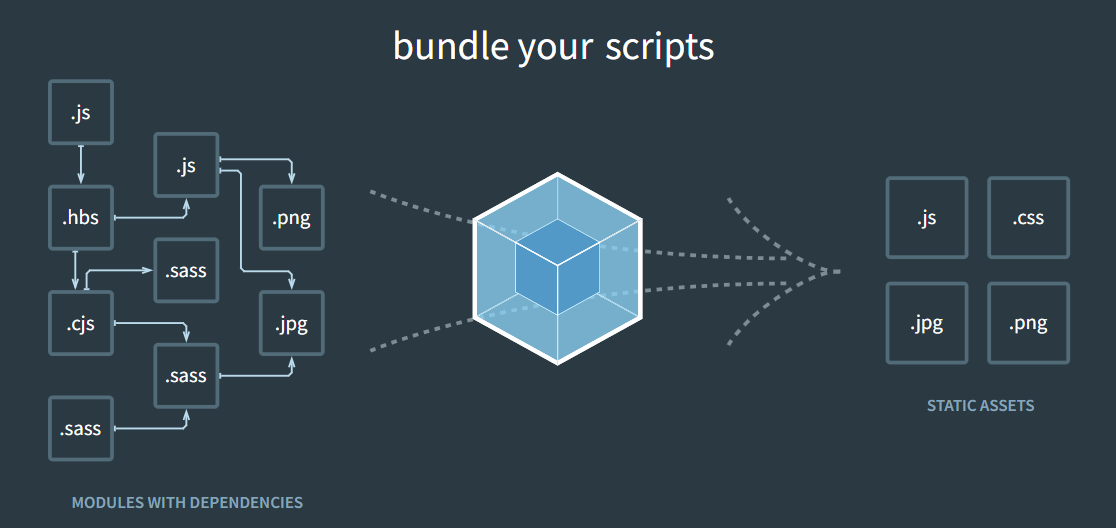
Streamlining Atlassian Plugin Development With Webpack An Essential Guide For Developers

Webpack: Simplifying Asset Management for Atlassian Plugins

image-20240524-063234.png

Understanding Webpack

Taming The Attachment Beast A Smarter Way To Manage Files In Jira And Confluence

Easy attachment vertical (1).png


Jira and Confluence have become essential to how my team works. From planning to documentation, we rely on them every day. But with that constant activity comes something I didn’t expect attachment overload.

Over time, our projects became cluttered with screenshots, PDFs, and outdated files. It slowed things down, made important attachments harder to find, and even impacted storage. Cleaning things up manually? A nightmare. That's when I discovered Vamhi Easy Attachment.

🎯 What Changed After I Started Using Easy Attachment

Honestly, the difference was immediate. Vamhi Easy Attachment gave me all the tools I needed to finally clean up and organize our attachments without wasting hours.

image-20250729-063303.png

Here’s what I love most:


🗑️ Bulk Deletion

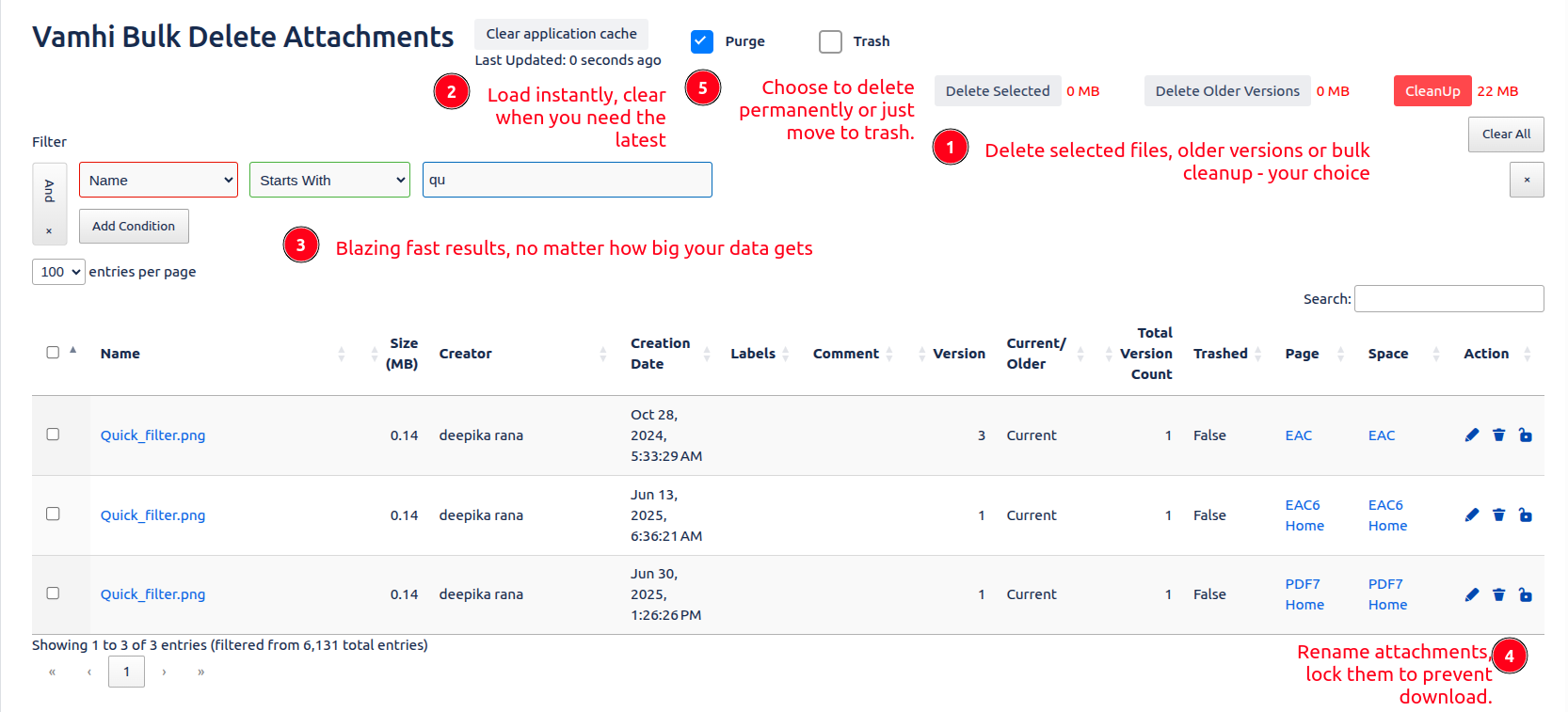
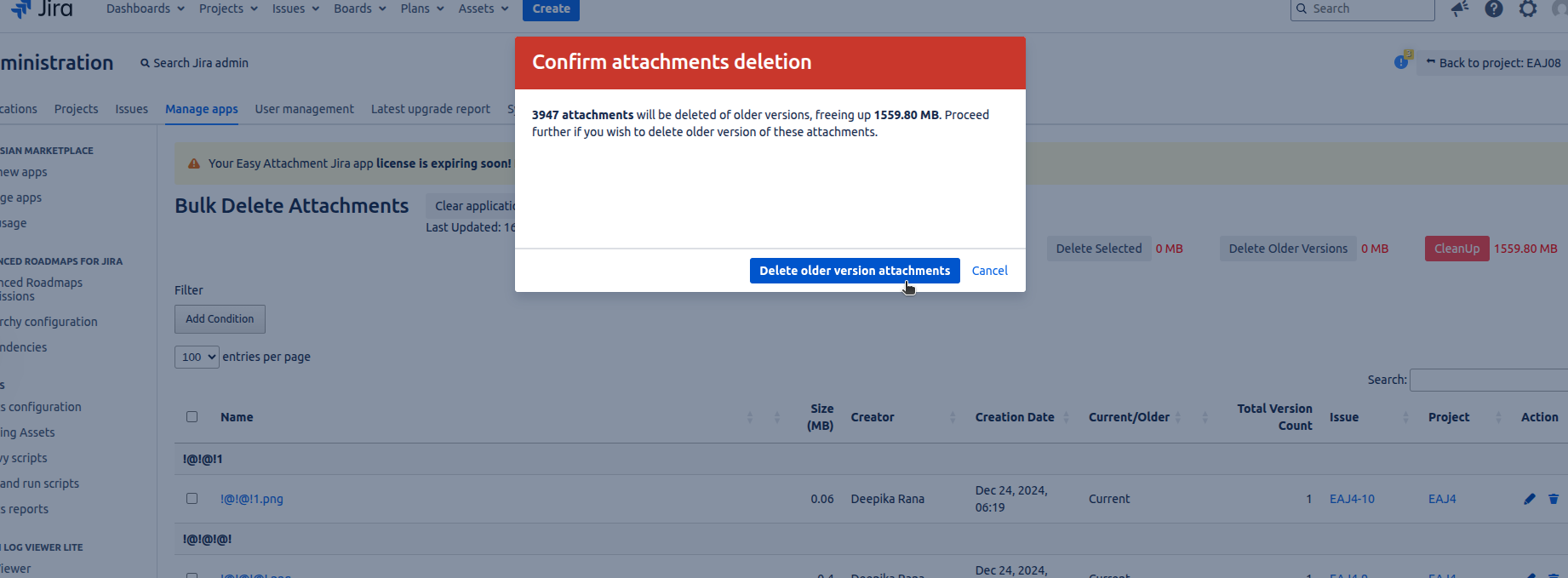
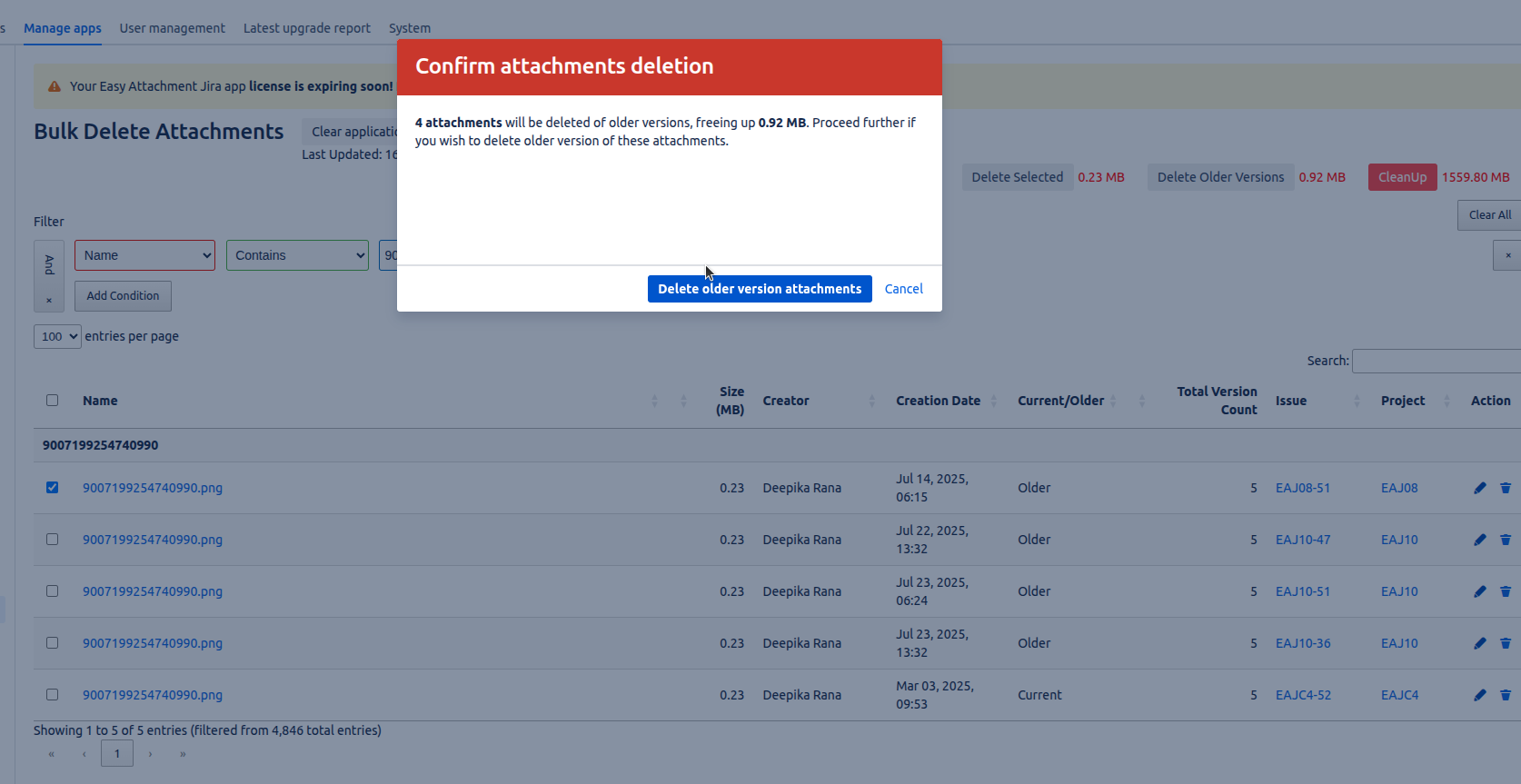
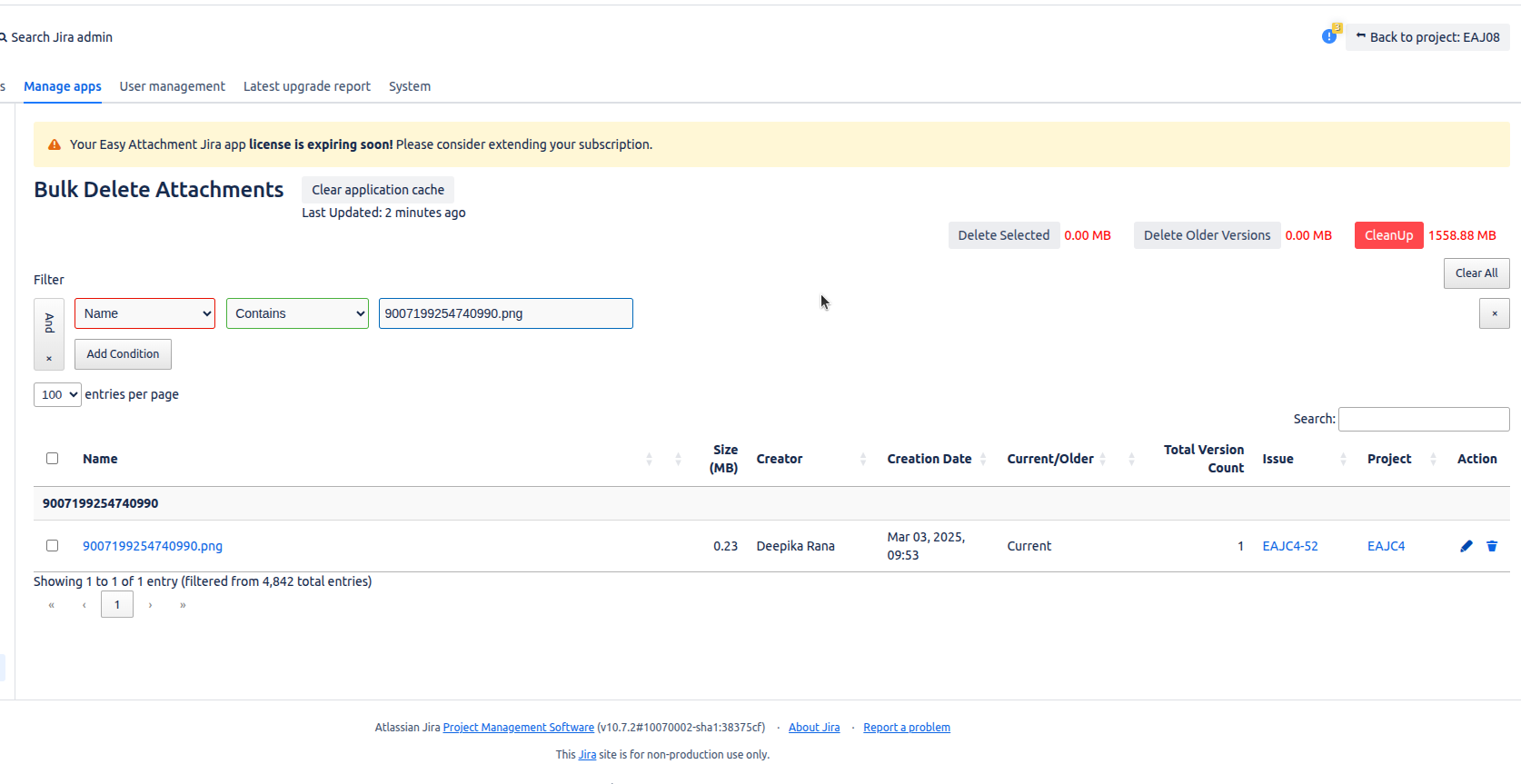
I can select multiple files and delete them all at once no more clicking through each attachment. Our Confluence pages and Jira issues look so much cleaner now.

image-20250729-072140.png


🧭 Duplicate Detection

It even helps me find and remove duplicates that were just taking up space. I didn’t realize how many near-identical screenshots we had until this feature pointed them out.

image-20250729-072249.png

image-20250729-072327.png


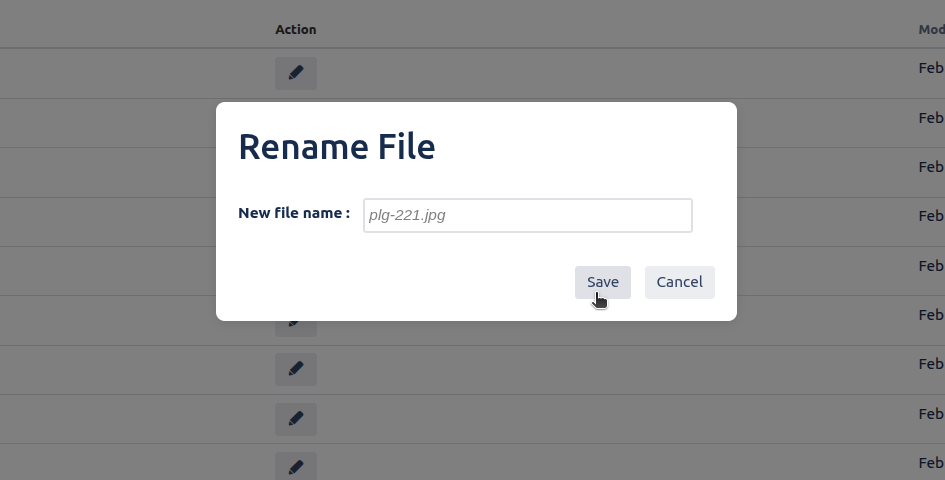
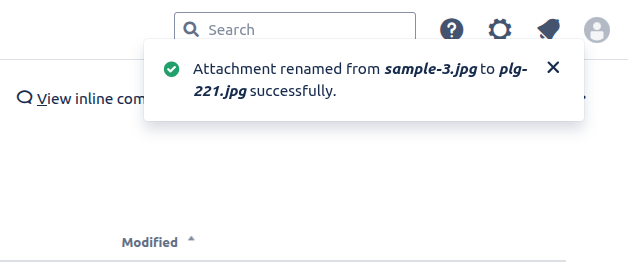
✏️ Easy Renaming

Now, I rename files right inside Jira or Confluence, so attachments actually have meaningful names like error-log-April instead of image123.png.

image-20250729-065953.png

image-20250729-070019.png


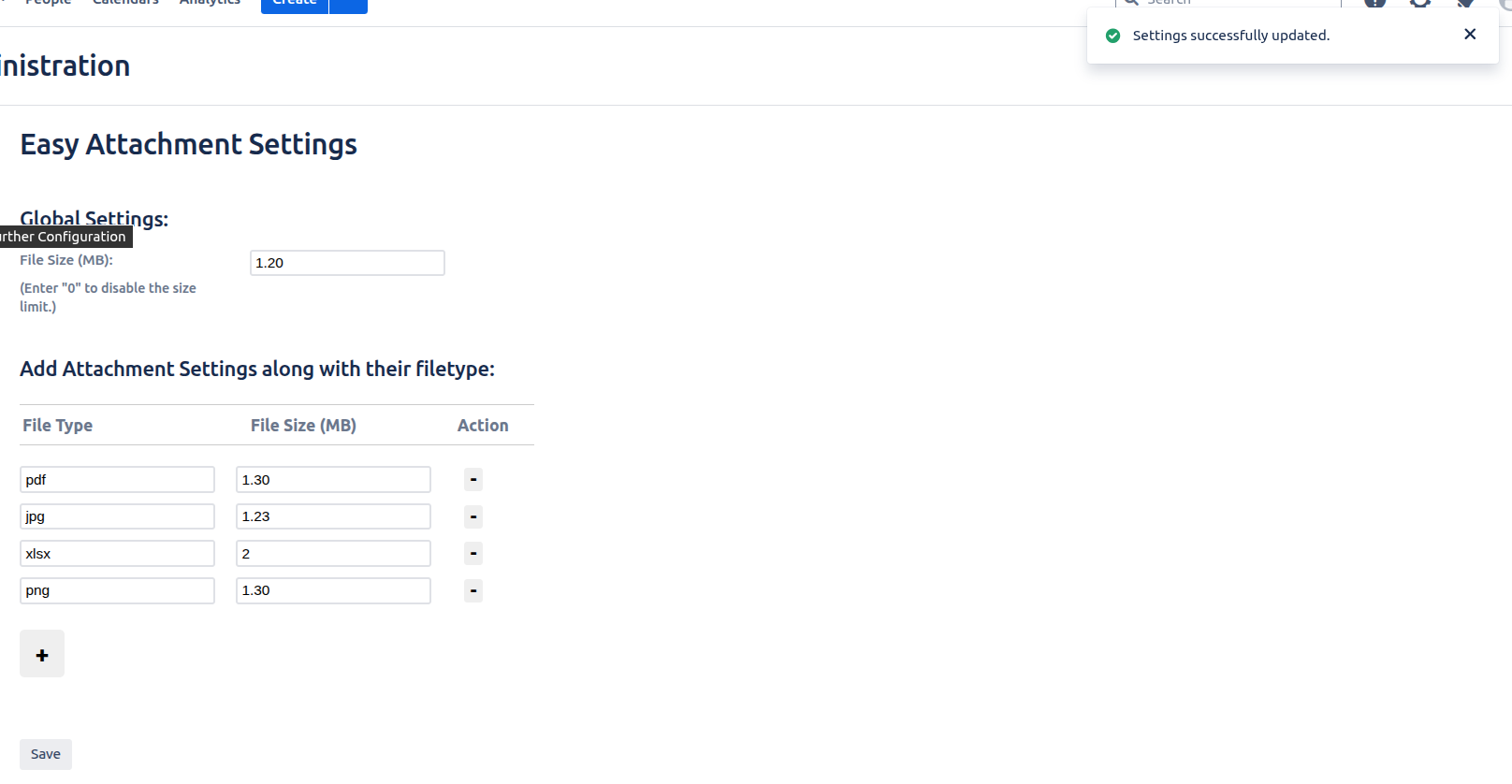
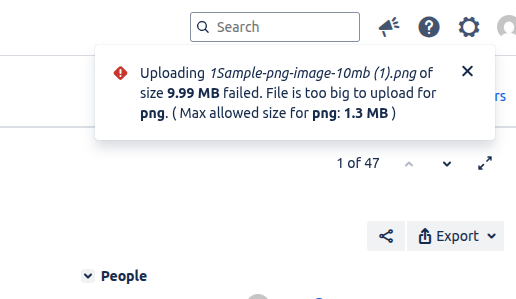
🚫 Upload Restrictions

We set limits on file sizes to avoid huge uploads slowing everything down. It’s a small setting that made a big difference in performance.

image-20250729-065716.png

Screenshot from 2025-07-14 16-16-33-20250729-063924.png


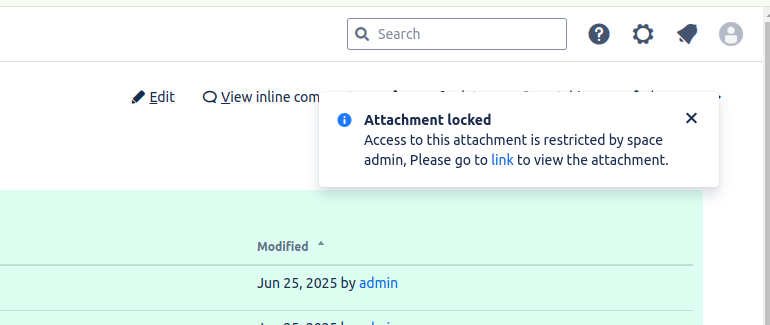
🔐 Attachment Locking

Some files just shouldn’t be touched especially sensitive or approved content. With locking, I make sure only the right people can download them.

Screenshot from 2025-06-17 16-08-15-20250617-103815.png

Screenshot from 2025-06-27 13-28-17-20250627-075817.png


Available Wherever You Need It

One of the best things? I can manage attachments no matter where I am in Jira or Confluence.

  • In Jira, it’s available at the project, issue, and global levels.

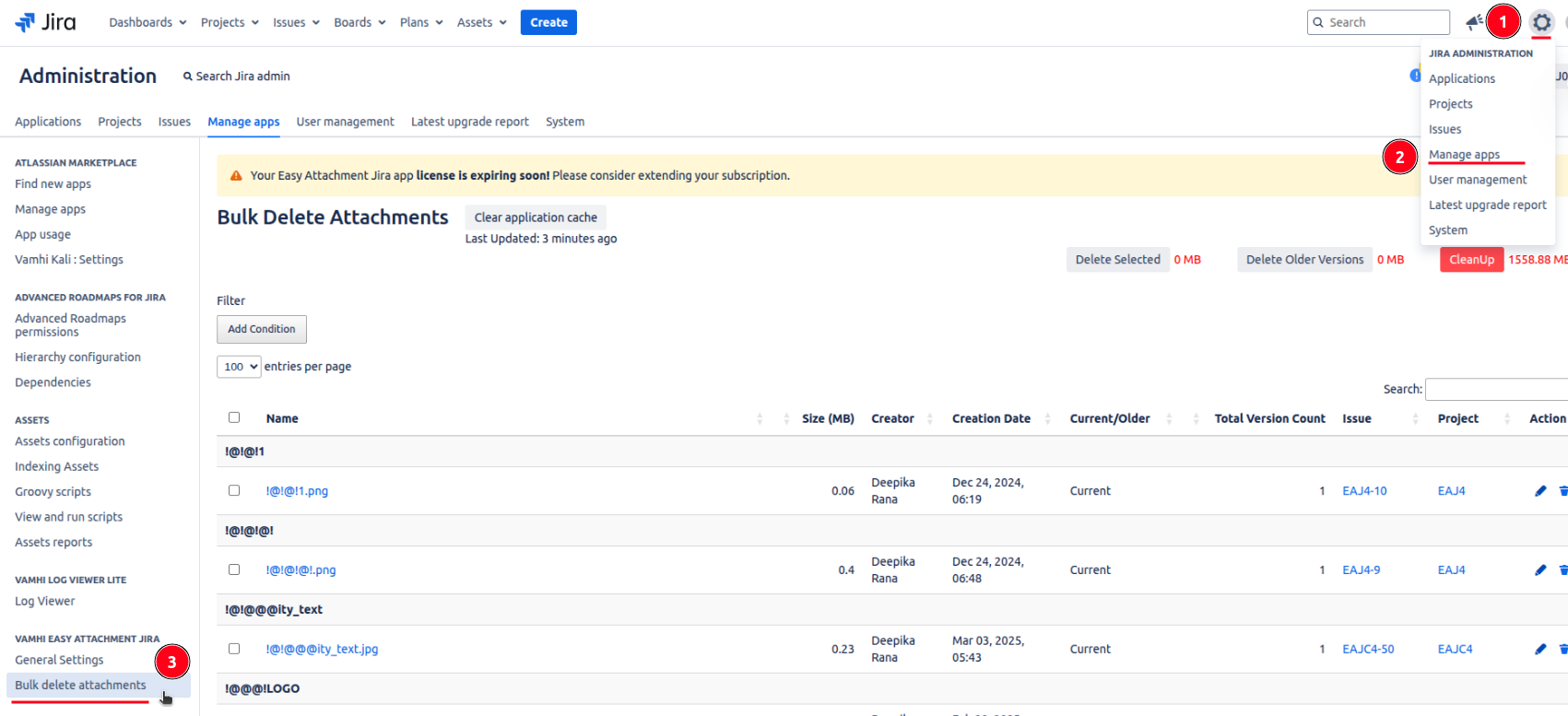
Global Level

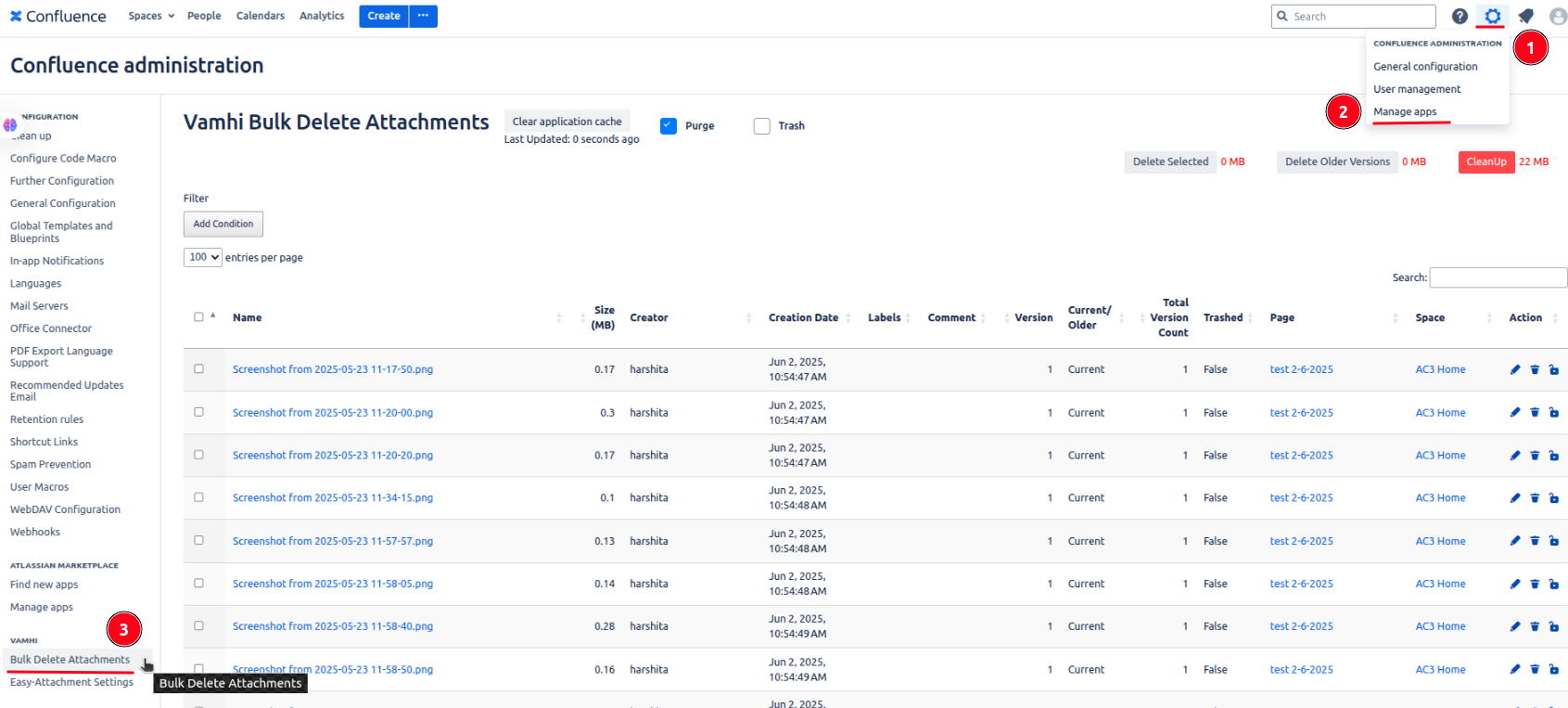
Go to manage apps of your settings → click bulk delete attachments.

image-20250730-111846.png

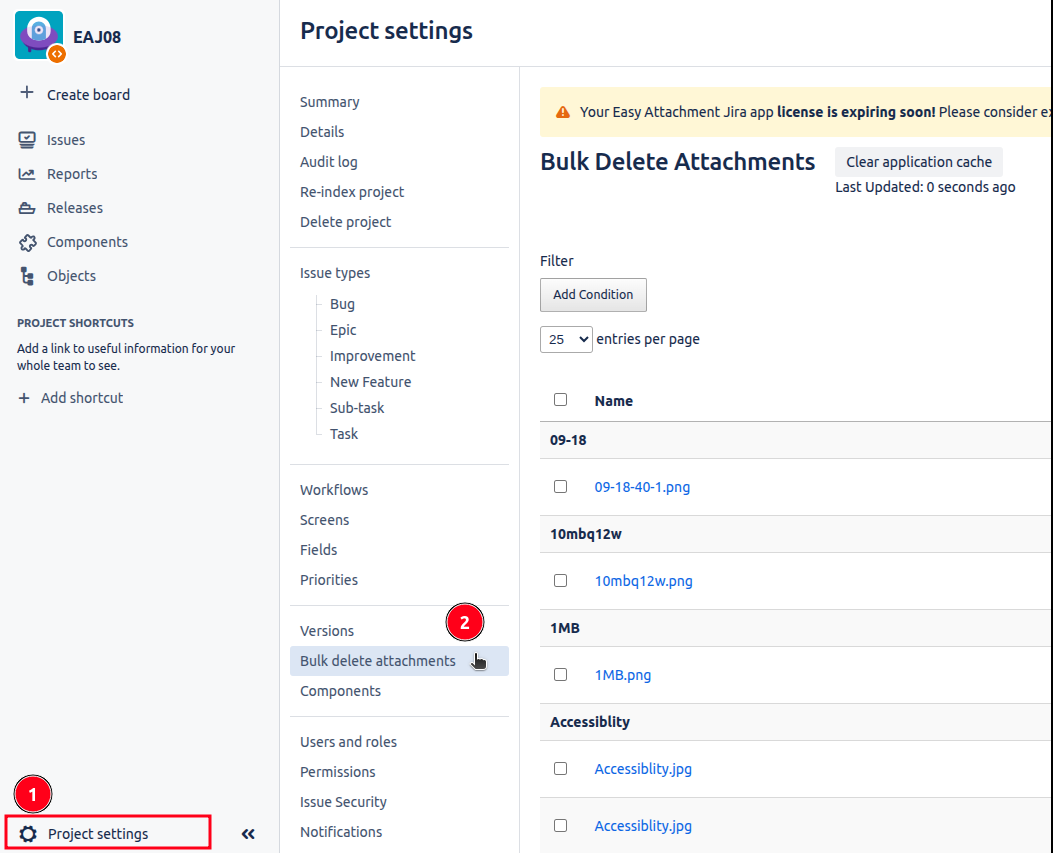
Project Level

Go to your project settings → click bulk delete attachments.

image-20250730-111611.png

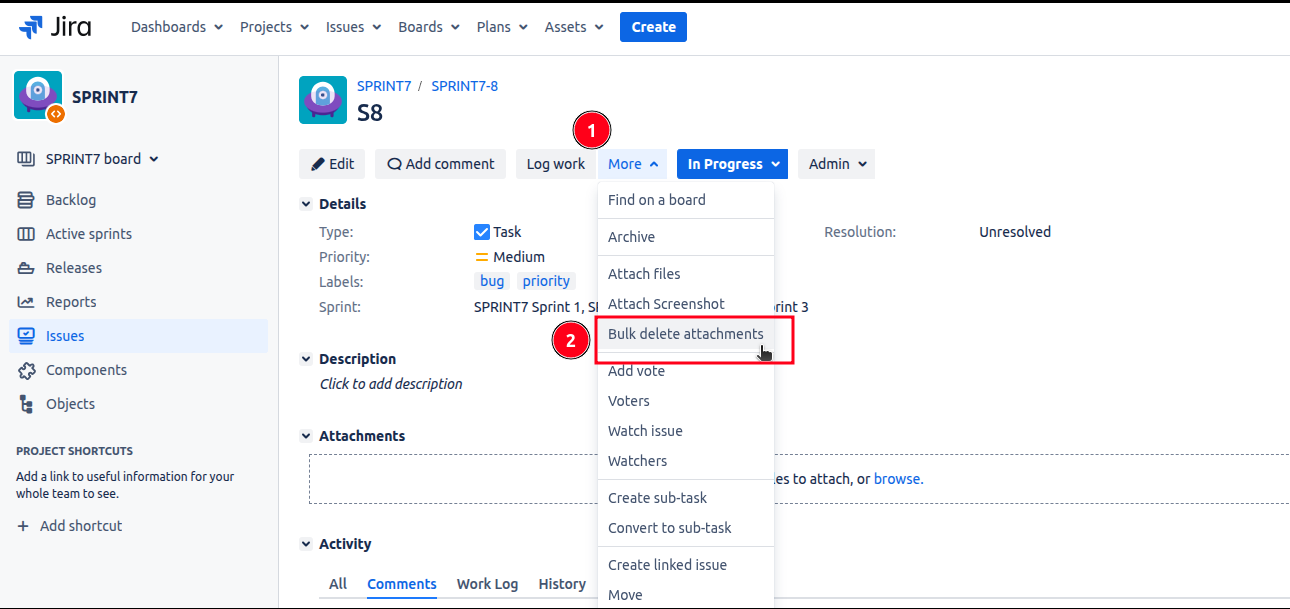
Issue Level

Go to your issue → click more → click bulk delete attachments.

image-20250730-111230.png

  • In Confluence, it works on the page, space, and global levels.

Global Level

Go to manage apps of your settings → click bulk delete attachments.

image-20250730-115251.png

Space Level

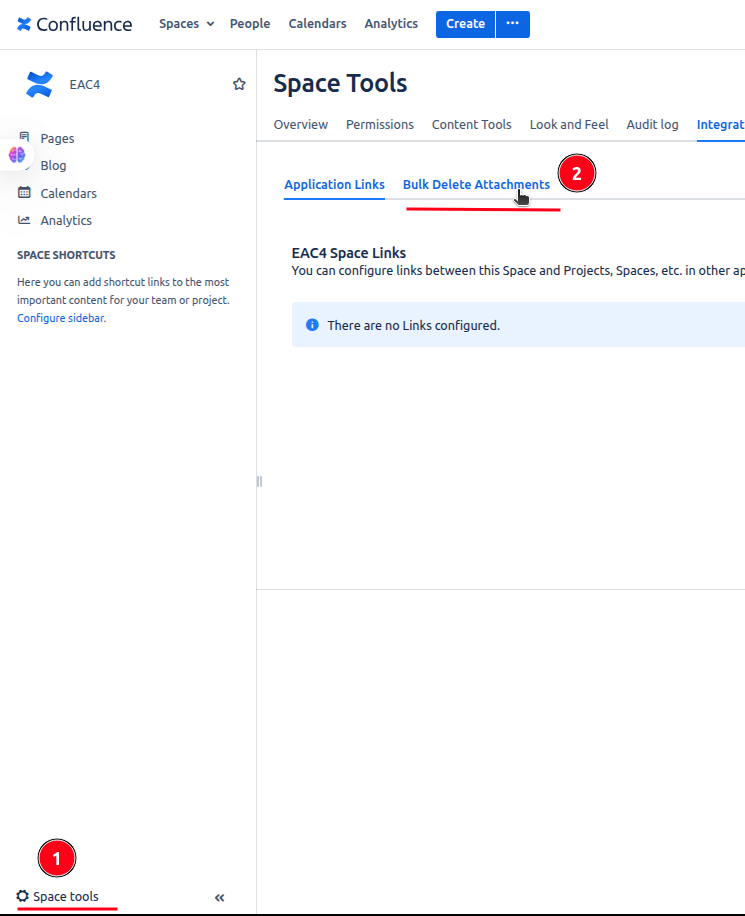
Go to space settings of your space → go to integrations → click bulk delete attachments.

image-20250730-115520.png

Page Level

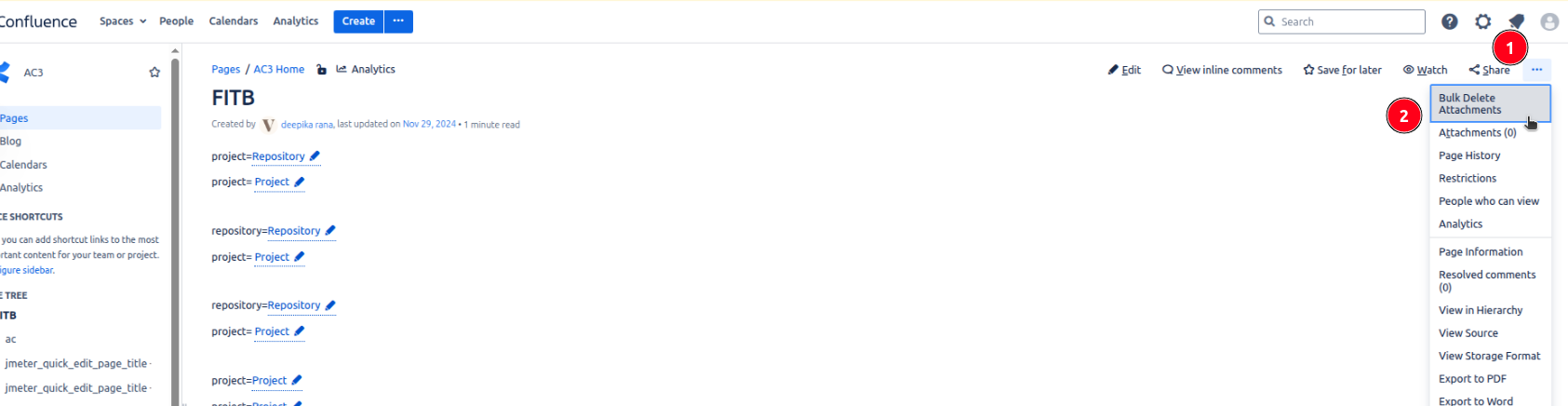
Go to your confluence page → click on triple dot icon appears at top right corner → click on bulk delete attachments.

image-20250730-115719.png

That means whether I’m cleaning up a single issue, a space-wide documentation dump, or handling admin cleanup across the site I can delete, rename, or lock attachments from anywhere.


⚡ What I Like the Most: Blazing Fast Performance with Smart Caching

One of the things that impressed me the most? How fast everyth

ing loads even with millions of attachments.

Vamhi Easy Attachment doesn’t just rely on brute force. It uses a smart caching system to quickly load data, and processes everything in manageable batches. The result? I get a lightning-fast response every time, without freezing up the UI or overloading the system.

Even when working with massive projects or large Confluence spaces, performance never slows down and that’s a game changer.


Screenshot from 2025-07-30 16-31-30.png

Screenshot from 2025-07-30 16-27-10.png

🚀 Blazing Fast & Memory-Efficient Plugin

Even under active usage, our plugin demonstrates exceptional memory efficiency.

State

Used Memory

Free Memory

Total Memory

Without Plugin

737 MB

1311 MB

2048 MB

🧩 With Plugin

744 MB

1304 MB

2048 MB

  • 🔍 Memory Overhead: Only 7 MB increase that’s just 0.34% of the JVM heap.

  • 🧠 64% Free Heap remains untouched, proving how minimal and optimized the plugin is.

  • 📈 Seamless performance with no garbage collection stress or spikes.

Built for performance. Engineered for efficiency.


⚡ Lightning-Fast API Performance & Load Times
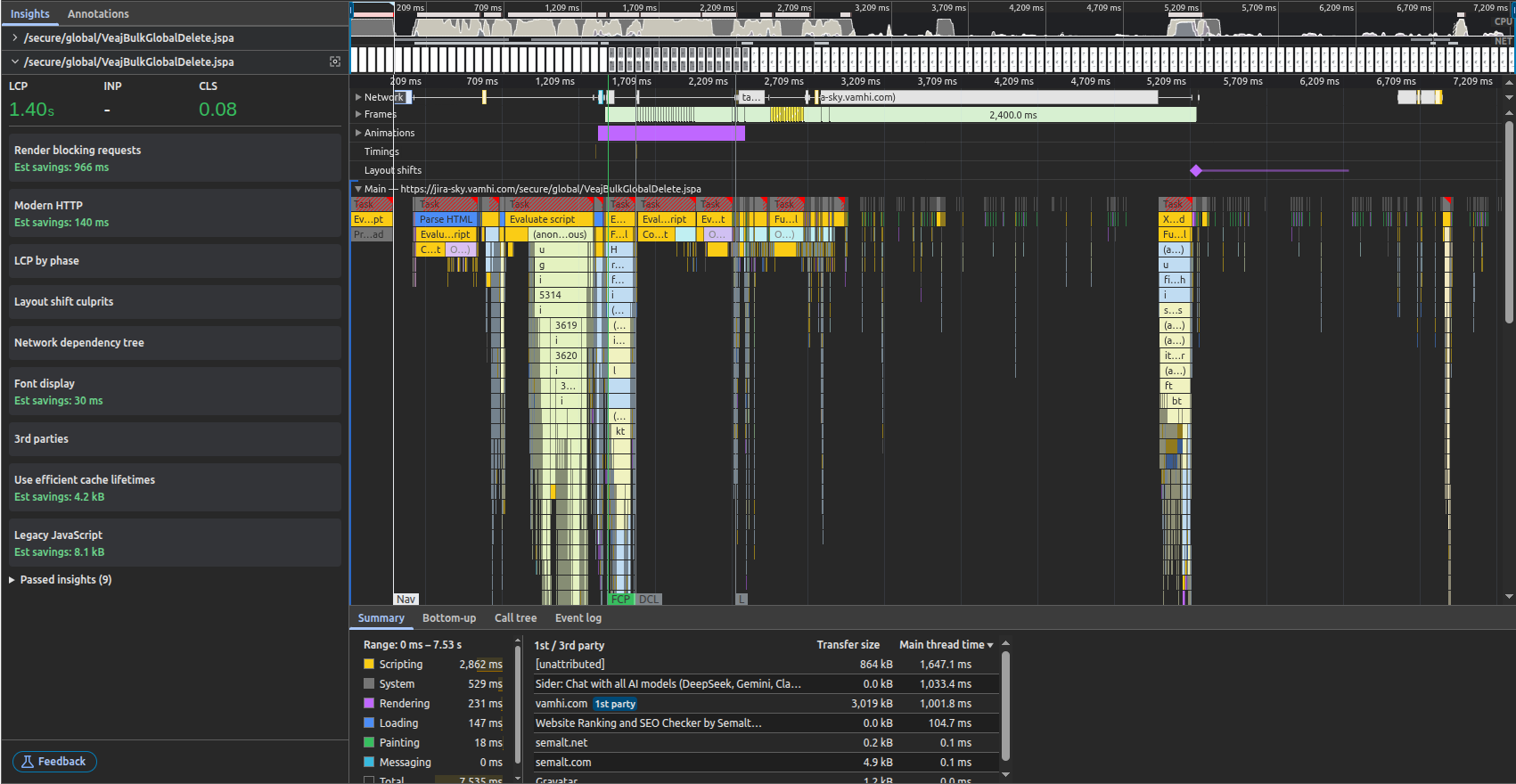
image-20250730-103920.png

✅ 1. Lightning-Fast LCP: 1.40s

  • Largest Contentful Paint was hit at 1.40 seconds, well below the 2.5s “good” threshold.

  • This proves that the page's most important content became visible very quickly.

🟢 Google considers LCP < 2.5s as excellent. You’re faster than that.


✅ 2. Stable Layout – CLS: 0.08

  • Cumulative Layout Shift is just 0.08 well within the “Good” range (≤ 0.10).

  • Means your page is visually stable, without unexpected jumps while loading.


✅ 3. Zero Blocking Resources Detected

  • No render-blocking JS/CSS delaying page load.

  • Estimated savings: 966 ms shows your optimization game is strong.


✅ 4. Efficient Use of HTTP:

  • Uses modern HTTP protocols, reducing connection overhead (140 ms savings).

  • Shows backend + network stack are well-tuned.


✅ 5. All Data Loaded in ~7.5 Seconds

  • The total time to full interactive (TTI) is under 7.53 seconds.

  • This includes everything: scripting, network, rendering, etc.


✅ 6. JavaScript Time Distribution

Phase

Time

Scripting

2.8s

System

0.5s

Rendering

0.2s

Loading

0.1s

  • The scripting load is well-contained.

  • No major delays from rendering or layout recalculations.


✅ 7. Efficient Third-Party Usage

  • First-party domain vamhi.com had ~3 KB transfer in 1s — super lean.

  • No bloated trackers or heavy analytics slowing things down.


✅ 8. FCP/DCL Timing

  • FCP (First Contentful Paint) hits around 1.2s

  • DCL (DOMContentLoaded) just after 2s

  • Indicates good separation of loading and execution phases.

Scenario

Metric

Load 5000 attachments

1.2s (measured via DOMContentLoaded)

XHR requests per 1000 attachments

~35–38 KB, < 3s load time per batch

Total API throughput (5000+)

All batches fetched in ~7–12 seconds

Attachment search filter response

< 400 ms


✅ In Short...

Easy Attachment gave me back control. No more clutter, no more wasted time hunting for files, and our team can actually find what they need, when they need it.

If you’re feeling the same attachment overload, I highly recommend trying it out. There’s a free trial and once you use it, you won’t go back.


👉 Try Easy Attachment for Jira and Easy Attachment for Confluence, the tools that made attachment management simple again.

🔍 Bulk delete, rename, restrict, and clean up files all inside the Atlassian tools you already use.

The Real Magic Of Working From Home It S Not Just Pajamas

By Deepika Rana | Aug 1, 2025 | 4 min read

Let’s get this out of the way: yes, working in yoga pants while sipping homemade lattes is glorious. But if that’s all you think remote work offers, you’re missing the best part. As a new mum navigating deadlines and diaper changes, I’ve discovered something profound: remote work doesn’t just change where you work, it transforms how you live.

1. Stolen Hours: The Commute Payoff

The Role Of Chat Gpt In Software Development A Tool Not A Crutch

Written by : Harshit Sharma on Sep 13, 2024

Artificial intelligence (AI) is rapidly transforming various industries, and software development is no exception. ChatGPT is helpful, but not an answer to every question. Developers should avoid too much reliance on ChatGPT. Developers should know how to use their skills and try to solve the complex problem first on their own to increase their knowledge and self-reliance, and also do research before using AI tools like ChatGPT.

Developers might become overly dependent on AI tools, leading to a decline in their problem-solving skills and deep understanding of programming concepts.

Understanding Atlassians Design System And Achieving Uniformity

A design system is like a blueprint for digital products. It's a set of rules and tools that teams use to keep the look and feel of products consistent. A design system streamlines your team's workflow by tackling repetitive tasks and addressing recurring issues, reclaiming valuable time. A design system aids in managing the complexity of product transitions between dark and light themes. A design system teaches new designers about the product and its rules, allowing them to get productive faster.

It has many advantages, but it does not come without some obstacles. One of the challenges is continuous maintenance. Like any other product, the design must be kept up to date to remain relevant.

Public design systems tackle the aforementioned problem in large part since they provide thorough documentation, pre-built components, and design principles. This can greatly minimize the time and effort necessary for the first setup when compared to creating your own system from scratch. Public design systems are often maintained by internal teams or even the open-source community. They frequently issue updates, upgrades, and bug fixes to keep the design system relevant and current with the newest design trends and best practices. This reduces the strain on your team to constantly monitor and update the design system. In this article, we will look at one of the public design systems, the Atlassian Design System.

Usage Of DC Automated Testing With Python A Step By Step Selenium Tutorial For Hello World


Selenium is a powerful tool for web automation, and when combined with Python, it becomes an easy-to-use yet efficient framework for automating tasks on web applications. In this tutorial, we will walk you through automating a simple ‘Hello World’ task on Jira Data Center (DC) using Selenium in Python. We will cover how to detect web elements, execute JavaScript code, and even debug your automation script. Let’s dive in!

Prerequisites:

Why Website Speed Matters And How To Improve It

In today's digital World, website performance is directly linked to the success of your online business. Websites that load quickly retain users better than those with slower load times. For example, a case study on How The Economic Times passed Core Web Vitals thresholds and achieved an overall 43% better bounce rate ,demonstrates the real cost of website performance. In this blog, we'll explore the key factors that make a website faster and how you can improve your site's speed.


1. Reducing Time to First Byte(TTFB):

  • TTFB is a metric that measures the time between the request for a resource and when the first byte of a response begins to arrive.

  • The First Request for Web Page is for an Html resource. So Reducing TTFB for first resource loading will make website load quickly

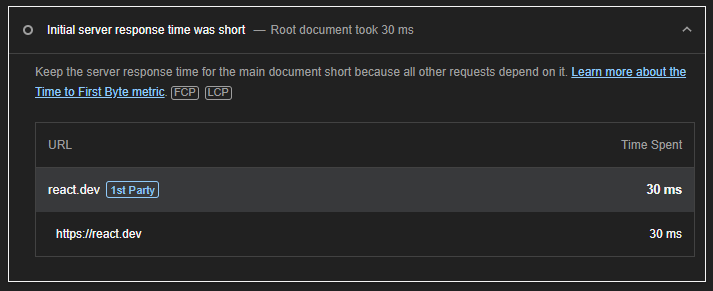
  • To measure the Time to First Byte (TTFB) for a website, you can generate a Lighthouse report using your browser's developer tools. Start by right-clicking on the website and selecting "Inspect." Navigate to the "Lighthouse" tab within the developer tools. From there, click on "Analyze page load" to generate the report. Once the analysis is complete, you can find the TTFB details in the relevant section of the report, similar to the example shown in the attached image.

    image-20241115-080655.png

  • Try to minimize the redirects as it requires browser to make an additional request. Focus on reducing Same origin redirects because as you have control over it while managing cross origin redirects can be tough as it is generally is out of your control.

  • Use Content Delivery Network(CDN) as they helped in quick loading by caching and compressing static resources.

  • A TTFB time of 0.8 second or less is considered good for websites